How Do I Reduce Computer Screen Glare From Office Windows — The Complete Solution Guide

Authored By Michael Turner -30 Years Home Improvement Expertise | Updated 2026 | BlindShades.pro
Updated on May 11, 2026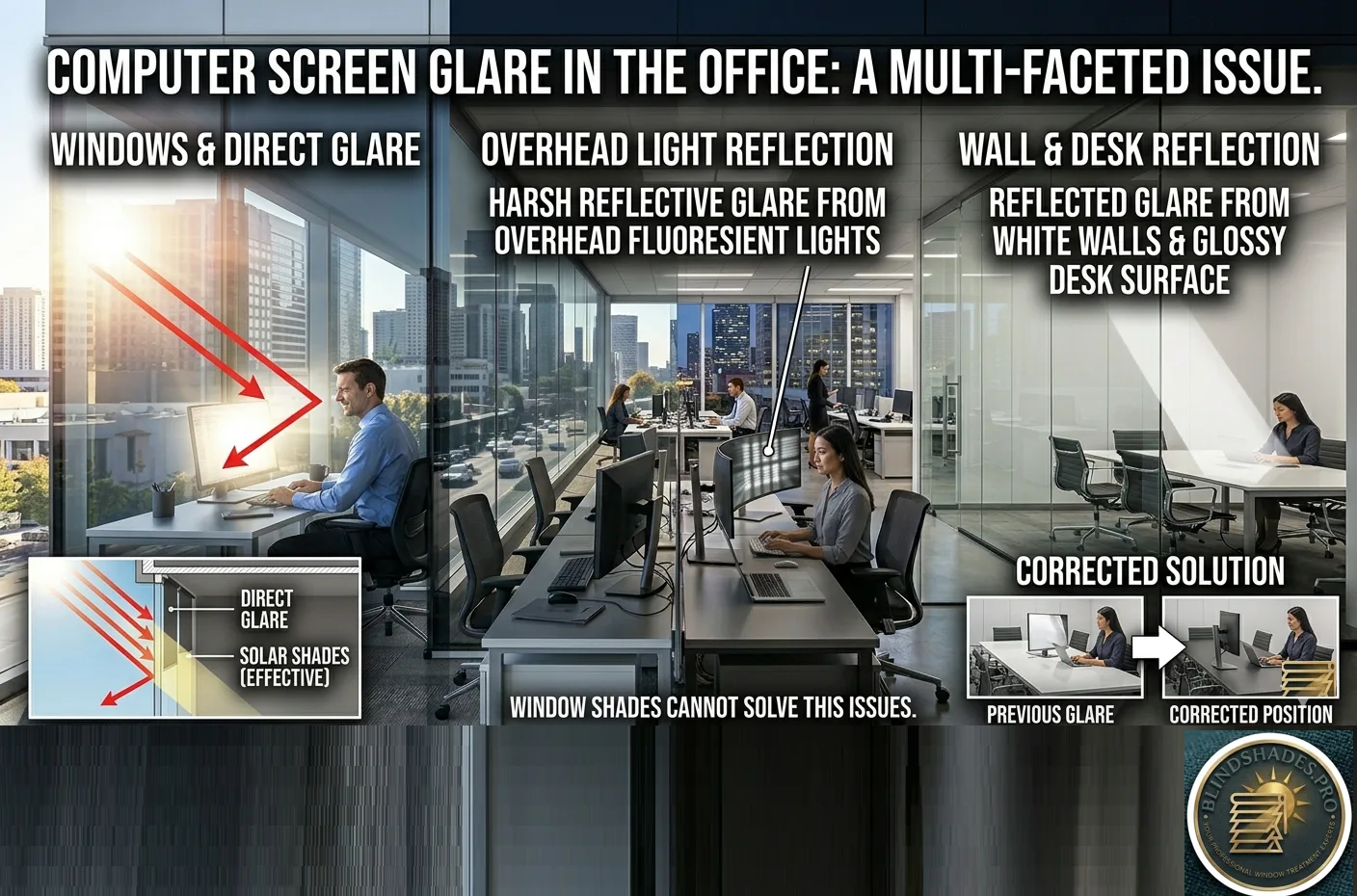
⭐ Quick Answer — How Do I Reduce Computer Screen Glare From Office Windows?
- Step 1 — Diagnose First: Close all window coverings completely. If glare disappears → window is the cause (solar shades will help). If glare persists → overhead lighting is the cause (window treatments will NOT help — a different fix is needed)
- Tilt Monitor Test: Tilt monitor 5–10° downward. If glare reduces → overhead fixture reflections in the screen are the cause. The fix is not window blinds — it’s changing overhead lighting (UGR below 19 per EN 12464-1) or adding a monitor hood ($20–$80)
- For Window-Caused Direct Glare — By Orientation: East-facing (peak 7–10am) → 3–5% openness charcoal solar shade · West-facing (peak 2–5pm) → 1–3% openness charcoal, motorized · South-facing (peak 11am–2pm) → 3–5% + TDBU shade · North-facing → 7–10% or no treatment needed
- Colour Matters for Screen Workers: Dark/charcoal solar shades absorb diffuse skylight → less reflected light toward your monitor screen. White or cream shades reflect diffuse light back toward the screen → MORE veiling glare on monitor
- Motorized Scheduling: For east or west-facing offices — a motorized shade scheduled to lower only during the 1–2 hour peak glare window (not all day) gains 5–6 hours of beneficial natural daylight compared to a manually operated shade left down all day
- Best Sources: Motorized charcoal solar shade → Blindsgalore commercial (Phifer SheerWeave) · Manual 3–5% solar shade → SelectBlinds commercial roller · 3M Daylight Redirecting Film → 3M authorised commercial dealer
⚠️ The Most Common and Expensive Office Glare Mistake: The majority of office workers who install solar shades to reduce screen glare still have the same glare problem afterward — because the cause was overhead fluorescent or LED fixtures reflecting in the glossy monitor surface, not the window. Solar shades have zero effect on this type of glare. The simple diagnostic: turn off all windows coverings and look at your monitor when it is switched OFF. If you can see reflections of ceiling lights in the dark screen — overhead fixture reflection is a primary cause. The correct fixes are: monitor hood ($20–$80), indirect overhead lighting (uplighters, cove lighting), or confirming overhead fixtures meet UGR below 19 (EN 12464-1 computer workstation standard). Window treatments cannot help with overhead fixture reflections. See the full 3-type glare diagnostic below.
💡 3M Daylight Redirecting Film + Motorized Scheduling — The Superior Commercial Solutions: For offices that need glare control without blocking the view — 3M Daylight Redirecting Film applied to the upper window zone redirects 80% of direct solar radiation toward the ceiling rather than absorbing it, maintaining a clear unobstructed lower view while eliminating eye-level direct glare. It also reduces artificial lighting needs by up to 52%. And for east or west-facing offices — motorized auto-scheduling lowers the solar shade only during the 1–2 hour peak glare window, gaining 5–6 hours of natural daylight the manually operated shade blocks unnecessarily. Per the WELL Building Institute — uncontrolled glare reduces cognitive task performance by 15–25%. See the full motorized scheduling guide below.
📖 Read the complete guide below for: the 3-type glare diagnostic with curtain test and monitor tilt test, the three specific glare types and their different solutions, the direction-specific glare guide by window orientation with peak times, why charcoal solar shades outperform white for screen workers, the 3M Daylight Redirecting Film mechanism explained, the motorized scheduling approach with hours-gained calculation, the complete priority hierarchy of fixes, and where to order by application type.
The Diagnostic Step Nobody Does — Identifying Your Glare Source
Every guide on this topic jumps straight to solar shade and blind recommendations. Before recommending any window treatment, the correct first step is identifying what is actually causing the glare on your specific screen. Installing a solar shade for the wrong type of glare is wasted money and effort.
Test 1 — The Curtain Test Close all window coverings completely so no daylight enters. Look at your monitor screen. If the glare problem disappears — the cause is direct or indirect daylight from the window. Solar shades, window film, or blind adjustments will help.
If the glare problem persists with windows fully covered — the cause is artificial interior lighting (overhead fluorescents, LEDs, or desk lamps). Window treatments will not help. Go to the artificial lighting section below.
Test 2 — The Daylight Direction Test With windows uncovered, note where the glare appears on your screen at different times of day. If glare is worst in the morning on an east-facing window — the cause is low-angle direct morning sun. If glare is worst in the afternoon on a west-facing window — the cause is intense afternoon sun. If glare appears fairly uniformly throughout the day — the cause is diffused daylight (overcast sky reflected into the room) or interior artificial lighting.
Test 3 — The Monitor Tilt Test Tilt your monitor slightly downward (5–10 degrees forward). If the glare reduces significantly — the cause is overhead light (ceiling fixtures) reflecting in the glossy monitor surface. Window treatments will not eliminate this; repositioning the monitor or installing a monitor hood is the effective solution.
The Three Types of Office Screen Glare — Different Causes, Different Solutions
Type 1 — Direct Glare: Sunlight Hitting Your Eyes
Cause: A window is positioned in front of or behind the monitor, creating a bright light source within the field of vision that the eye cannot adapt to simultaneously with the dimmer monitor image.
The specific problem: The human eye adapts to the luminance level of the dominant light source in its field of view. When a bright window (100,000+ lux direct sun) is visible alongside a monitor (150–300 lux surface luminance), the eye adapts to the window and the monitor appears dark and hard to read. This is the brightness contrast that creates direct glare. The WELL Building Institute documents that uncontrolled direct glare reduces cognitive task performance by 15–25% in office environments.
Window treatment solutions for Type 1:
- Solar shades (1–5% openness) reduce window luminance while preserving view
- 3M Daylight Redirecting Film redirects 80% of direct solar radiation toward the ceiling, dramatically reducing window luminance while maintaining daylight penetration
- Venetian or horizontal blinds tilted upward redirect direct sun to the ceiling without fully blocking daylight
- TDBU (top-down bottom-up) shades — lower the top portion of the shade to block the direct sun angle while maintaining view from the lower glass area
Monitor positioning fix (free): Position the monitor perpendicular to windows — neither facing the window nor with the window directly behind. The window should be to the left or right of the monitor at a 90-degree angle.
Type 2 — Reflected Glare: Light Sources Reflected in Monitor Screen
Cause: Overhead lights, desk lamps, or bright surfaces reflect in the glossy monitor surface as bright spots or patches.
The critical insight: Window treatments have zero effect on reflected glare from overhead fixtures. This is the most common mismatch between the glare solution purchased and the glare problem experienced. Purchasing and installing solar shades when the glare is caused by overhead fluorescent tube reflections in the monitor will not reduce the glare at all.
Checking for overhead fixture reflection: Look at your monitor surface while it is turned off. If you can see reflections of overhead ceiling lights or fluorescent tubes in the dark screen surface — overhead reflected glare is a significant contributor to your glare problem.
Solutions for Type 2 reflected glare:
Option 1 — Overhead lighting compliance: The EN 12464-1 standard for workplace lighting (widely adopted by commercial architects in the USA) requires a Unified Glare Rating (UGR) below 19 for computer workstation areas. A UGR above 19 indicates overhead lighting that creates problematic glare on computer screens. Ask your building facilities manager whether your overhead lighting meets UGR 19. Fixtures that create high UGR values include exposed fluorescent strip lights, large-area surface-mounted panels with high luminance, and pendant lights positioned within the field of monitor view.
Option 2 — Indirect lighting: Replace overhead direct lighting with indirect lighting systems — uplighters, cove lighting, or fixtures that direct light toward the ceiling for diffuse reflection into the workspace. Indirect lighting with luminance below 200 cd/m² creates virtually no monitor screen reflection.
Option 3 — Monitor hood: A monitor hood (also called a monitor visor) is a three-sided enclosure that wraps around the top and sides of the monitor, blocking overhead light from reaching the screen surface. Professional photographers and colour graders use monitor hoods for accurate screen colour assessment in any lighting condition. For office use — a monitor hood eliminates overhead light reflection at approximately $20–$80 per unit.
Option 4 — Anti-reflective monitor screen: Matte screen monitors or anti-glare screen protectors scatter reflected light in multiple directions rather than producing a mirror-like reflection. An anti-reflective coating that reduces reflection to below 0.5% is the specification for professional monitor use in high-ambient-light commercial environments.
Type 3 — Veiling Glare: Diffused Room Brightness Washing Out the Screen
Cause: The overall room brightness is too high relative to the monitor image, reducing screen contrast and apparent image quality. White walls, glossy desk surfaces, and high-reflectance floor materials all contribute to room luminance levels that wash out the monitor.
Solutions for Type 3 veiling glare:
- Increase monitor brightness and contrast to compete with ambient room luminance
- Use a matte desk surface rather than glossy or glass-topped desks
- Position the monitor to face a dark wall rather than a bright window or white wall
- Reduce overhead lighting levels in the immediate workstation vicinity
The Direction-Specific Glare Guide — By Window Orientation
No standard glare reduction guide gives orientation-specific advice. The type and timing of glare differs dramatically by which direction your office window faces.
East-Facing Office Windows — Morning Glare (7–10am)
Peak glare period: 7am to 10am from April to September; 8am to 11am from October to March.
Glare characteristic: Low-angle direct sun entering the window at a near-horizontal angle. Extremely intense direct glare hitting the monitor from the left or front side during the first 2–3 hours of the workday.
Correct specification:
- Solar shade 3–5% openness in charcoal or dark neutral colour
- Motorized scheduling: shade scheduled to lower at sunrise and raise at 10am. After 10am the sun angle clears the window on most east-facing installations — the shade can be fully raised for the remainder of the workday
- Monitor positioned perpendicular to the east window (facing north or south)
West-Facing Office Windows — Afternoon Glare (2–5pm)
Peak glare period: 2pm to 5pm year-round; worst in summer when the sun is highest and hottest in the western sky.
Glare characteristic: The most problematic orientation for office productivity. Low-angle afternoon sun creates intense direct glare during peak afternoon productivity hours. West-facing offices also experience the highest solar heat gain of any orientation.
Correct specification:
- Solar shade 1–3% openness (strictest privacy and glare control) in charcoal or dark colour
- Motorized scheduling: shade scheduled to lower at 1pm and raise at sunset
- Alternatively: exterior solar screen (outside the glazing) for 60–80% cooling load reduction alongside glare control
South-Facing Office Windows — Overhead Midday Glare (11am–2pm)
Peak glare period: 11am to 2pm in winter when the sun is lower; less problematic in summer when overhead sun angle minimises direct window entry.
Glare characteristic: The sun angle is higher, reducing the intensity of direct entry through vertical windows but creating high overall room luminance.
Correct specification:
- Solar shade 3–5% openness
- TDBU (top-down bottom-up) shade: lower the top portion of the shade to block the overhead sun angle while maintaining view through the lower glass
- Monitor facing north or perpendicular to window
North-Facing Office Windows — No Direct Sun Glare
Glare characteristic: North-facing windows in the northern hemisphere receive no direct sun year-round. Glare from north-facing windows is always diffused skylight — significantly lower intensity than direct sun glare.
Correct specification:
- 7–10% openness solar shade (maximum daylight while managing diffuse glare)
- Often: no window treatment required for glare control — north-facing windows are a premium office orientation specifically because of the absence of direct glare
The 3M Daylight Redirecting Film — The Solution No Competitor Explains
Most glare reduction articles recommend solar shades to reduce the amount of light entering the office. 3M Daylight Redirecting Film takes a fundamentally different approach: instead of reducing the total amount of light, it changes the direction of the light.
How it works: 3M Daylight Redirecting Film is a prismatic optical film applied to the upper portion of commercial glazing (typically the top 30–40% of the window height). When direct solar radiation strikes the film, the prismatic structure redirects up to 80% of that light upward toward the ceiling at a near-horizontal angle. The redirected light then bounces off the ceiling as diffuse, even illumination — penetrating up to 40 feet deeper into the office floor plate than conventional daylight.
The commercial benefit for screen work: The window below the Daylight Redirecting Film zone remains clear (no solar shade). The occupant’s eye-level view through the window is unobstructed. But the direct solar radiation that would create screen glare or eye-level direct glare is redirected to the ceiling before it can reach the workstation.
According to 3M’s commercial data, Daylight Redirecting Film reduces the need for overhead artificial lighting by up to 52% during daylight hours — because the ceiling-bounced natural light provides the ambient illumination that electric lights would otherwise supply.
When this is the preferred commercial specification:
- Open-plan office floors with significant floor plate depth (40+ feet from window to interior)
- Buildings where occupants have objected to solar shades blocking the view
- Facilities pursuing LEED or WELL credits for both glare control and daylight delivery
- High-sun-exposure south and west-facing facades where both glare control and heat rejection are priorities
Source and installation: 3M Daylight Redirecting Film is available through 3M authorised commercial window film dealers. It requires professional installation and is typically specified as part of a commercial building retrofit or fit-out.
The Motorized Scheduling Solution — Smarter Than a Manual Solar Shade
In most commercial offices with manual solar shades, the shade is lowered in the morning to address a glare problem — and remains fully lowered for the rest of the workday, blocking daylight unnecessarily for 6–7 hours to solve a glare problem that only exists for 1–2 hours.
The productivity and wellbeing cost: Research published in the International WELL Building Institute’s standard framework documents that access to natural light in commercial workplaces improves occupant wellbeing, sleep quality, and cognitive performance. A solar shade left fully lowered from 9am to 5pm eliminates this benefit entirely.
The motorized scheduling approach: A motorized solar shade programmed to lower only during the specific peak glare window for that window’s orientation — and raise automatically afterward — provides glare control without unnecessary daylight deprivation:
| Window Orientation | Glare Peak | Shade Schedule | Daylight Hours Gained |
|---|---|---|---|
| East-facing | 7–10am | Lower at sunrise, raise at 10am | 5–6 hours |
| West-facing | 2–5pm | Lower at 1pm, raise at sunset | 4–5 hours |
| South-facing | 11am–2pm | Lower at 10:30am, raise at 2:30pm | 5–6 hours |
| North-facing | No peak | Manual as needed | All day |
Available systems: Hunter Douglas PowerView motorization with sunrise/sunset scheduling. Blindsgalore commercial motorized roller shades with programmable schedules. Lutron Palladiom motorized shade system with building management integration for zone-by-zone scheduling.
Solar Shade Colour for Screen Workers — Dark vs Light
The standard solar shade buying guide says “darker colours provide a clearer outdoor view.” For screen workers, there is an additional consideration that no competitor guide addresses:
The reflected light issue with white/cream solar shades: A white or cream solar shade positioned facing east or west reflects a significant amount of the window’s diffuse skylight back toward the room interior — including toward the monitor surface. This reflected light from the shade fabric itself can create a secondary source of ambient veiling glare on the monitor screen.
The charcoal/dark solar shade advantage for screen workers: A charcoal or dark grey solar shade absorbs more of the window’s diffuse skylight rather than reflecting it into the room. The result is a slightly darker, more uniform ambient light environment in the zone adjacent to the window — which improves monitor contrast and reduces veiling glare.
Practical specification for screen-intensive commercial offices:
- East and west-facing windows (peak direct sun glare): charcoal or dark neutral 3–5% openness solar shade
- South-facing windows: charcoal or dark neutral, same openness
- North-facing windows: colour choice is primarily aesthetic — the glare-from-shade effect is minimal without direct sun
The Complete Priority Hierarchy — What to Do First
- Identify the glare type first (curtain test, monitor tilt test). Don’t buy anything yet.
- Fix monitor positioning (free): perpendicular to windows, facing a neutral wall, slightly tilted downward.
- If Type 2 (overhead fixture reflection): address overhead lighting UGR first; add monitor hood if needed. Window treatments will not help.
- If Type 1 (direct sunlight): install solar shade appropriate to orientation and floor level, in charcoal/dark colour for screen work. Specify motorized if glare is concentrated in a 1–2 hour window per day.
- For south-facing offices with deep floor plate: assess 3M Daylight Redirecting Film on the upper window zone alongside a solar shade on the lower zone for the optimal commercial specification.
- For WELL-certified or LEED commercial projects: confirm solar shade openness factor achieves DGP below 0.35 per WELL Feature L07; confirm overhead lighting meets UGR 19 per EN 12464-1.
Where to Order — Affiliate Recommendations
For motorized solar shades with scheduling: Blindsgalore commercial motorized roller shades — Phifer SheerWeave commercial fabric in charcoal, 3–5% openness, with motorized lift and programmable scheduling. Lutron Palladiom — premium motorized shade with building management system integration for zone-by-zone scheduling.
For manual solar shades at mid-range commercial pricing: SelectBlinds commercial roller shades in 3% or 5% openness, charcoal or dark grey colour, cordless lift. Blindsgalore Envision commercial roller shade with cassette headrail for clean commercial appearance.
For 3M Daylight Redirecting Film: Contact a 3M authorised commercial window film dealer for assessment and installation quote. Available for large commercial installations with DGP modelling service from select 3M partners.
Frequently Asked Questions
How do I reduce computer screen glare from office windows? First identify the type of glare: direct glare from sunlight requires solar shades or window positioning; reflected glare from overhead lighting on the monitor screen requires overhead lighting changes and cannot be fixed by window treatments. For direct sunlight glare — install a solar shade with 3 to 5 percent openness in charcoal or dark colour, positioned perpendicular to the window. For west-facing office windows, consider a motorized shade scheduled to lower only during the 2pm to 5pm peak glare window, allowing full daylight access the rest of the workday.
What percentage solar shade is best for reducing computer screen glare? For south and west-facing commercial office windows — 1 to 3 percent openness reduces direct solar glare most effectively. For east-facing windows — 3 to 5 percent. For north-facing windows — 7 to 10 percent is typically adequate. In charcoal or dark colour, because lighter shades reflect diffuse skylight back toward the monitor surface, increasing veiling glare on the screen. According to the WELL Building Institute, the goal is to achieve a Daylight Glare Probability below 0.35 in the workstation zone.
Do solar shades reduce glare on computer screens from overhead lights? No — solar shades address only daylight entering through the window. Glare on a computer screen caused by overhead fluorescent or LED fixtures reflecting in the monitor surface is not affected by window treatments. To verify whether overhead lights are the cause, tilt the monitor slightly downward — if glare reduces, overhead fixtures are a primary contributor. The EN 12464-1 standard requires a Unified Glare Rating below 19 for computer workstation areas. A monitor hood or indirect overhead lighting replacement are the correct solutions for overhead-light screen glare.
What is the best window treatment for a west-facing office with afternoon screen glare? For a west-facing commercial office with afternoon glare affecting computer screens — specify a motorized solar shade in 1 to 3 percent openness, charcoal or dark colour, with a programmed schedule to lower at 1pm and raise at sunset. This controls the intense afternoon sun during the 2 to 5pm peak period while allowing full daylight access during morning hours. Manual solar shades are typically left down all day in west-facing offices, unnecessarily eliminating 4 to 5 hours of beneficial natural light. Motorized scheduling is the correct commercial specification.
Related Guides on BlindShades.pro
- The Best Office & Commercial Blinds & Shades Buying Guide — the complete commercial blind specification guide
- The Best Solar Shades Buying Guide — solar shades in full technical depth
- Can You See Through Solar Shades From Outside — The Office Privacy Answer — solar shade privacy and openness factor guide
- Are Solar Shades Worth It for a Commercial Office — the full commercial solar shade value analysis
- Motorized vs Manual Commercial Blinds — The 10-Year ROI Comparison — the motorized scheduling ROI calculation in depth
By Michael Turner | 30 Years Home Improvement Expertise | Updated 2026 | BlindShades.pro
