Best Blinds for a Home Office on Zoom — The Lighting, Glare and Background Setup

Authored By Michael Turner -30 Years Home Improvement Expertise | Updated 2026 | BlindShades.pro
Updated on July 14, 2026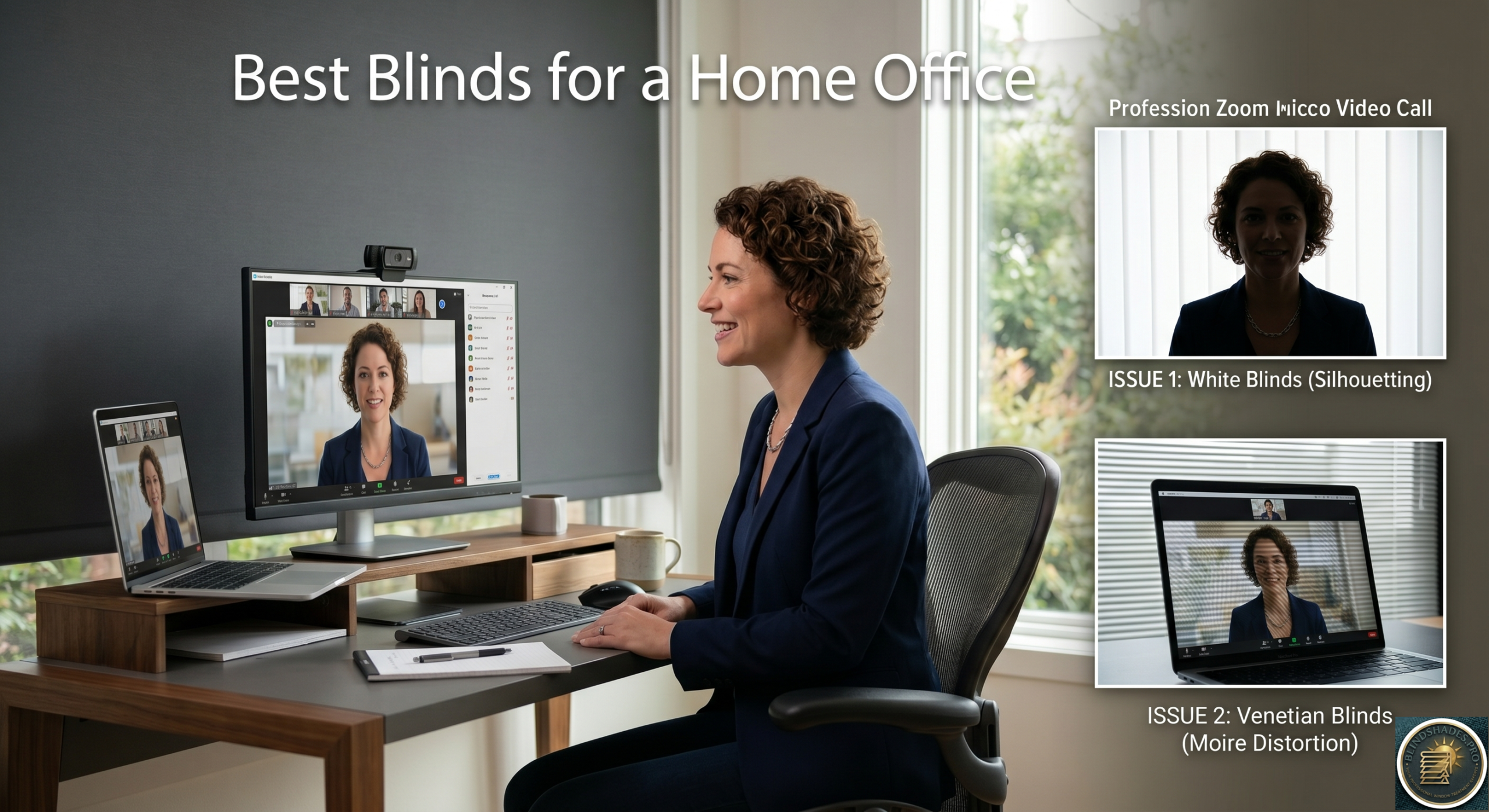
⭐ Quick Answer — Best Blinds for a Home Office on Zoom
- The Critical Colour Rule: Specify mid-grey or charcoal roller shade as your Zoom backdrop — NOT white. White blinds behind you have luminance 5–10× higher than your face, forcing the camera to darken your face. Charcoal shades have luminance within 2–3× of your face — the camera exposes correctly
- Avoid Venetian Slats as Zoom Background: Regular horizontal slat patterns create moire compression artifacts in 720p/1080p Zoom video — the slat lines appear to shimmer and shift on the other person’s screen. Use solid-fabric roller shades behind you instead
- By Window Orientation: North-facing = best for Zoom (soft diffuse light, 7–10% solar shade or sheer) · East-facing = close charcoal blackout shade during morning calls (7–10am) · West-facing = close charcoal shade during afternoon calls (2–5pm) · South-facing = 3–5% solar shade to diffuse overhead light
- Dual-Layer All-Day Setup: Solar shade (front, 3–5% charcoal) for daytime calls + blackout roller shade on second cassette headrail for morning and evening calls when exterior light reverses and creates silhouettes. Both on a double cassette headrail
- Acoustic Benefit for Zoom Audio: Cellular (honeycomb) shades provide NRC 0.10–0.20 vs bare window NRC 0.00 — reducing room reverb by 20–40% for clearer voice quality on calls. Pair with a fabric drape for maximum acoustic improvement
- Best Sources: Dual roller shade → Blindsgalore dual roller system · Solar shade 3–5% charcoal → SelectBlinds solar roller · Cellular for acoustics → Blinds Chalet cordless cellular
⚠️ The Two Things Every Zoom Blind Guide Gets Wrong: (1) They treat Zoom as one problem. It’s actually two: screen glare (what YOU see) and camera exposure (what THEY see). White blinds behind you solve neither and worsen exposure. The blind facing you manages your screen glare. The blind behind you manages the camera’s background luminance. These need different treatments — often different colours. (2) They give generic advice regardless of window orientation. East-facing windows create a silhouette problem from 7–10am only. West-facing from 2–5pm only. North-facing windows essentially never create a Zoom problem. South-facing create harsh overhead shadows. The solution depends entirely on which direction your window faces — generic “face a window” advice is incomplete. See the direction-specific Zoom setup guide below.
💡 The $25–$400 Setup Guide — What Each Investment Level Achieves: $25–$50 (single charcoal light-filtering roller shade) = glare control + improved camera exposure balance + no moire. Good for north-facing and daytime-only east/west calls. $75–$150 (solar shade facing you + charcoal shade behind you) = dual-purpose setup for most home office orientations. $200–$400 (dual-layer solar + blackout on double cassette headrail ± motorized) = all-day Zoom flexibility for any time of day, any orientation, any lighting condition. Motorized option lets you adjust shade position without leaving your desk or interrupting a call. See the full cost-performance breakdown below.
📖 Read the complete guide below for: why Zoom has two separate problems (your screen glare vs camera exposure); the 3-point lighting principle applied to blind selection; the camera exposure luminance ratio explained; why charcoal shades outperform white for Zoom; why venetian slats create moire in compressed video; the direction-specific Zoom setup guide (north/east/west/south with peak problem hours); the NRC acoustic table for Zoom audio quality; the dual-layer all-day Zoom strategy; and the complete cost-performance framework ($25–$400).
The Two Separate Zoom Problems That Need Two Different Solutions
Every home office blinds guide treats Zoom as a single problem — “reduce glare so you can see your screen.” This misses the second and equally important problem: what does the camera see behind you?
Problem 1 — Glare on your screen: Bright daylight from a window causes glare on your monitor. You can’t see your screen clearly. This affects your ability to work.
Problem 2 — Camera exposure imbalance: A bright window behind you causes the Zoom camera’s automatic exposure to compensate for the bright background — by darkening everything in the frame, including your face. You look like a silhouette even in a well-lit room.
The distinction matters for blind selection:
- For Problem 1 (screen glare): you need a blind that reduces the amount of light hitting your screen — solar shade or TDBU shade controlling the lower window zone where direct sun enters at screen height
- For Problem 2 (camera exposure): you need a blind that reduces the luminance of the background the camera sees — a closed roller shade in mid-grey or charcoal behind you
The correct Zoom-ready home office setup addresses both problems with a single layered specification.
The 3-Point Lighting Principle — Applied to Home Office Blind Selection
Professional broadcast studios and television sets use 3-point lighting to make subjects look naturally lit and well-defined. The same principle applies to Zoom calls — and it directly determines which blinds to specify.
The 3-point lighting setup:
1. Key light (primary illumination, front of subject): The brightest light source, positioned in front of and slightly to the side of the speaker. In a home office — this should be the window or a desk lamp positioned in front of you.
2. Fill light (secondary, opposite side of key): A softer light that fills in the shadows created by the key light. In a home office — a desk lamp on the opposite side from the window.
3. Backlight (behind subject, defines separation from background): A subtle light that separates the subject from the background. In a home office — indirect ambient room lighting.
The blind’s role in 3-point lighting: The window can be your key light — but only if it is in front of you (you face the window). If the window is behind you, it becomes an uncontrolled backlight that overwhelms the camera. The blind must reduce this window-behind-you from a dominant backlight to a controlled background element.
Practical application:
- Window in front of you: Use a sheer or light-filtering roller shade on the front window to soften the key light. Leave the blind partially lowered to diffuse direct sun without blocking the soft daylight you need.
- Window behind you: Close a mid-grey or charcoal roller shade completely. The camera now sees a uniform dark background and the exposure is set for your face, not the window.
- Window to the side of you: Use a solar shade (3–5% openness) to reduce the side lighting to a manageable level without eliminating it.
The Camera Exposure Triangle — Why Blind Colour Matters for Zoom
This is the specific Zoom technical detail absent from every competitor guide.
How Zoom camera exposure works: Zoom and most video conferencing cameras use automatic exposure that balances the overall luminance of the frame. The exposure algorithm targets the average luminance of the entire frame — including the speaker’s face AND the background behind them.
The white shade problem: A white or cream roller shade behind the speaker has a luminance that can be 5–10× higher than the speaker’s face when lit by typical room lighting. The camera compensates by reducing overall exposure — darkening the speaker’s face to prevent the white background from being overexposed.
Measured example:
- White roller shade in daylight: approximately 2,000–5,000 cd/m²
- Speaker’s face in typical room lighting: approximately 200–500 cd/m²
- Luminance ratio: 10:1 or higher
- Camera response: reduces exposure → speaker’s face appears dark
The mid-grey shade solution: A mid-grey or charcoal roller shade behind the speaker has a luminance of approximately 300–800 cd/m² in the same daylight conditions — within 2–3× of the speaker’s face luminance. The camera’s automatic exposure sets correctly for the face while the background appears natural.
The blind colour specification for Zoom:
- Best Zoom backdrop colours: mid-grey (Pantone 424–430 range), charcoal, dark neutral warm grey, sage green, slate blue
- Avoid for Zoom backdrop: white, cream, bright warm yellow, high-gloss finishes, mirrored metallic finishes
- For blinds that face the camera (as background): dark neutral tones
- For blinds that face you (as light source control): any colour works — this blind manages the light quality, not the backdrop
The Direction-Specific Zoom Setup — By Window Orientation
Every home office Zoom guide gives generic advice. The correct setup depends entirely on which direction your window faces.
North-Facing Window (Best for Zoom)
The Zoom advantage: North-facing windows in the northern hemisphere provide soft, diffused, consistent daylight throughout the day — no direct sun, no hard shadows, no dramatic luminance changes between morning and afternoon.
Blind specification:
- Light-filtering roller shade or sheer shade to maintain a soft diffuse quality
- 5–10% openness solar shade if UV protection is needed
- No blackout required — the north window never creates harsh glare or silhouette problems
Desk positioning: Face the north window. Use it as your key light source. This is the optimal Zoom setup requiring the least intervention.
East-Facing Window — Morning Silhouette Problem (7–10am)
The Zoom problem: Morning meetings with an east-facing window behind you create the silhouette effect exactly during peak morning call hours (8am–10am). The low-angle morning sun is extremely intense and creates a massive luminance imbalance.
Blind specification:
- Behind you (east window): Close a mid-grey or charcoal blackout roller shade completely during morning calls (7–10am). Raise it after 10am when direct sun angle clears the window.
- Front lighting: Use a desk lamp or ring light positioned in front of you to compensate for the closed window behind.
Desk positioning: For east-facing windows, consider repositioning the desk to face the window rather than having the window behind — face the morning sun with a sheer shade to diffuse it as key lighting.
West-Facing Window — Afternoon Silhouette Problem (2–5pm)
The Zoom problem: This is the worst orientation for afternoon Zoom calls. Intense afternoon sun creates dramatic silhouette effects during peak afternoon meeting hours (2pm–5pm).
Blind specification:
- Behind you (west window): Close a charcoal roller shade or room-darkening shade during afternoon calls. Add a desk lamp in front.
- Motorized option: A motorized shade programmed to lower at 1pm and raise at 5pm handles afternoon meetings without manual adjustment — particularly valuable for heavy meeting schedules.
The key principle: West-facing windows during afternoon calls require a closed, dark-coloured shade behind the speaker without exception.
South-Facing Window — Overhead Harsh Shadow Problem
The Zoom problem: South-facing windows create overhead light at midday that produces unflattering harsh shadows under eyes and nose — the “harsh overhead spotlight” look that video compression exaggerates.
Blind specification:
- 3–5% openness solar shade to reduce direct overhead light intensity
- TDBU (Top Down Bottom Up) shade: lower the top portion to block the harsh overhead sun angle while keeping the lower glass open
The key principle: For south-facing windows — diffuse the light rather than eliminate it. A lightly filtered diffused south window actually provides flattering even illumination for Zoom if the intensity is reduced.
Why Venetian Slat Blinds Create Moire on Zoom
This is the video technical problem no competitor guide addresses — and it is one of the most visible Zoom quality issues in home offices.
What moire is: Moire is a visual artifact that occurs when two regular patterns interfere with each other. When the regular horizontal pattern of venetian blind slats is captured by a camera at a resolution that doesn’t perfectly align with the slat spacing, the camera’s pixel grid and the slat pattern interact to create a shimmering, shifting interference pattern in the video.
How Zoom compression makes it worse: Zoom compresses video at approximately 720p (1280×720 pixels) or 1080p (1920×1080 pixels). Video compression algorithms detect regular patterns and encode them efficiently — but when the pattern moves (as light conditions change and slat shadows shift), the compression algorithm reacts with visible blocking and shimmering artifacts.
What this looks like in practice: Venetian blinds visible in the background of a Zoom call can appear to shimmer, vibrate, or shift in a way that is distracting to participants and reduces perceived call quality. The effect is worst with narrow 1-inch aluminum slats in bright sidelight.
The solid fabric solution: A closed solid-fabric roller shade creates a uniform surface with no regular pattern for the camera to encode. Video compression handles uniform surfaces efficiently — the background looks stable and professional without any shimmering artifacts.
Blind specification for moire prevention:
- Use roller shades with solid, plain fabric as the Zoom background
- Avoid venetian blinds, faux wood blinds, or any product with regular horizontal slat patterns in the camera’s background zone
- If venetian blinds are already installed — close them fully and angle the slats upward to present a more uniform surface; or hang a solid fabric roller shade on a tension rod in front of them as an inexpensive fix
The Acoustic Benefit for Zoom Audio Quality
Most home office guides mention that cellular shades absorb sound. None of them quantify what this means for Zoom audio quality.
The reverb problem on Zoom: Hard surfaces — windows, walls, floors — reflect sound. In a small home office with reflective surfaces, your voice bounces multiple times before reaching the microphone, creating audible reverb that makes your voice sound echoey and less intelligible on the other end of the call.
How blinds reduce reverb: Fabric-based window treatments absorb sound rather than reflecting it. The Noise Reduction Coefficient (NRC) measures the fraction of incident sound absorbed:
| Window Treatment | Approximate NRC |
|---|---|
| Bare window (unshaded) | 0.00 (reflects all) |
| Light-filtering roller shade (standard weight) | 0.03–0.08 |
| Heavy blackout roller shade | 0.05–0.12 |
| Cellular shade (honeycomb, standard) | 0.10–0.20 |
| Heavy lined drape layered with cellular shade | 0.20–0.35 |
For a typical 10×12 foot home office with two windows — replacing bare windows with cellular shades and layered drapes can reduce the room’s total reverberation time by 20–40%, measurably improving vocal clarity on Zoom calls.
The specification implication: For home office Zoom audio quality — cellular shades with a fabric drape layer provide the best acoustic improvement. Roller shades alone provide minimal acoustic benefit. The Blinds Chalet Q&A correctly identifies cellular shades as the acoustic recommendation for video call environments.
The Dual-Layer Zoom Strategy — The All-Day Solution
This is the most practical home office Zoom blind specification — and no competitor guide describes it.
The problem with single-shade specifications: A single solar shade manages daytime glare well — but fails for morning (7–9am) and evening (5–7pm) calls when interior lighting is brighter than exterior, reversing the one-way privacy effect and showing the interior to anyone on the call. A single blackout shade works for morning and evening calls but blocks too much daylight during daytime meetings.
The dual-layer solution:
Layer 1 — Solar shade (daytime calls): 3–5% openness solar shade in mid-grey or dark neutral colour. Manages daytime glare and provides adequate background neutrality for midday and afternoon calls. Raises completely when not needed.
Layer 2 — Blackout roller shade on separate headrail (morning and evening calls): Charcoal or dark neutral blackout roller shade on a second cassette headrail above or below the solar shade. Lowers for morning calls (7–10am) when east or west windows create silhouette problems. Lowers for evening calls (5–7pm) when interior lighting becomes dominant.
The dual-layer specification: Both shades mount on a single double-cassette headrail — the solar shade at the front and the blackout at the rear. The combination provides complete Zoom flexibility for any time of day, any exterior lighting condition.
Available from: Blindsgalore dual roller shades, SelectBlinds layered shade system, Hunter Douglas Duette dual shade.
The Minimum Viable Zoom-Ready Setup — What $25–$50 Achieves
Every competitor guide recommends premium products without telling buyers what a minimum investment delivers. This is the honest cost-performance guide.
The $25–$50 minimum setup (one window, standard size): A single light-filtering cordless roller shade in grey or charcoal from SelectBlinds or Blindsgalore. Achieves:
- ✅ Screen glare reduction during daytime calls
- ✅ Improved camera exposure balance (dark background)
- ✅ Moire prevention (solid fabric)
- ❌ Not adequate for morning/evening silhouette problems
- ❌ Minimal acoustic benefit
The $75–$150 mid-range setup: A solar shade (3–5% openness) in charcoal for the window facing you, plus a light-filtering roller shade in dark neutral for the window behind you. Achieves:
- ✅ Daytime screen glare control
- ✅ Improved camera exposure balance
- ✅ View preservation during calls (solar shade)
- ✅ Adequate for most east/west facing windows
- ❌ Not adequate for extreme morning silhouette conditions
The $200–$400 premium setup: Dual-layer solar + blackout shade on double cassette headrail. Motorized option available. Achieves:
- ✅ All-day Zoom-ready flexibility
- ✅ Ideal camera exposure balance at any time of day
- ✅ Morning and evening silhouette prevention
- ✅ Motorized adjustment without desk disruption
- ✅ Maximum background professionalism
Related guides: the home office is the seventh commercial space — the glare geometry and openness math behind these picks live in our office & commercial buying guide.
Where to Order — Home Office Zoom-Ready Blind Specifications
For the dual-layer Zoom-optimised specification: Blindsgalore dual roller shade system — solar front and blackout rear on a single double cassette headrail. SelectBlinds layered roller shade — solar and room-darkening combination.
For the mid-range single solar shade: SelectBlinds solar roller shade in 3% charcoal — the starting point for most home offices. Blindsgalore Envision Light Filtering Roller Shade in grey or charcoal — balanced daylight management.
For the acoustic upgrade: Blinds Chalet cordless cellular shade — recommended in their own Q&A for video call acoustic improvement. Pair with blackout roller shade on second headrail for complete specification.
Related guides: compare dark-fabric picks and openness percentages in the best solar shades buying guide.
Frequently Asked Questions
What are the best blinds for Zoom calls in a home office? The best Zoom-ready blind specification for most home offices is a mid-grey or charcoal light-filtering roller shade in solid plain fabric. The dark neutral colour balances the camera’s automatic exposure to your face rather than to the background. The solid plain fabric prevents moire compression artifacts from venetian slat patterns. For all-day Zoom flexibility — a dual-layer solar shade plus blackout roller shade on a double cassette headrail handles every time of day and window orientation.
Why does my face look dark on Zoom even in a well-lit room? Almost certainly because a window or bright light source is behind you. Your Zoom camera’s automatic exposure is compensating for the bright background by reducing overall exposure — which darkens your face. The fix is to close the window behind you with a mid-grey or charcoal roller shade, and position a desk lamp or window in front of you as your key light. White or cream blinds behind you worsen the exposure problem because they have a luminance 5–10× higher than your face, forcing the camera to under-expose your face to avoid overexposing the background.
Do venetian blinds look bad on Zoom? Yes — venetian slat blinds visible in the background of a Zoom call can create moire artifacts in the compressed video stream. The regular horizontal pattern of the slats interacts with the camera’s pixel grid to create a shimmering or shaking interference pattern that appears as visual noise to other participants. The solution is to use a solid-fabric roller shade as the Zoom background instead of venetian blinds. If venetian blinds are already installed — close them fully and angle slats upward to present a more uniform surface, or hang a solid fabric roller shade on a tension rod in front of them.
What blind colour is best for a Zoom background? Mid-grey, charcoal, dark neutral warm grey, muted sage green, or slate blue. These colours have a luminance within 2 to 3 times the luminance of a speaker’s face in typical room lighting, allowing the camera’s automatic exposure to balance correctly. Avoid white, cream, bright warm yellow, or any high-gloss fabric behind you on a Zoom call — these have luminance 5 to 10 times higher than a typical face, causing the camera to under-expose the speaker and make them appear dark or shadowed.
How do cellular shades improve Zoom audio quality? Cellular (honeycomb) shades have a Noise Reduction Coefficient of approximately 0.10 to 0.20 — meaningfully absorbing room sound rather than reflecting it off the hard window surface. For a typical 10 by 12 foot home office with two windows, replacing bare windows with cellular shades and a layered fabric drape can reduce room reverberation time by 20 to 40 percent, making the speaker’s voice sound clearer and less echoey to Zoom participants. This acoustic benefit is one of the reasons Blinds Chalet specifically recommends cellular shades for home office video call environments.
Related Guides on BlindShades.pro
- The Best Office & Commercial Blinds & Shades Buying Guide — the complete commercial specification guide
- How Do I Reduce Computer Screen Glare From Office Windows — the full glare diagnostic and window treatment guide
- Can You See Through Solar Shades From Outside — The Office Privacy Answer — the one-way vision and privacy guide for solar shades
- The Best Bedroom Blinds & Shades Buying Guide — the blackout and acoustic specification guide
- The Best Solar Shades Buying Guide — the complete solar shade specification guide
By Michael Turner | 30 Years Home Improvement Expertise | Updated 2026 | BlindShades.pro
